
Applications and teams
Goliash groups services two ways: by application (what a service is part of: a webshop, an identity stack) and by team (who owns it). The matrix, tiles, updates, upgrade plans and notification rules all use both.
Where applications come from
Section titled “Where applications come from”Each workload’s application is read from its labels, first match wins:
- the label set for the workspace on the Users page (Application label, e.g.
example.com/app); goliash.app,app.kubernetes.io/part-of,app.kubernetes.io/instanceorrelease(Helm),com.docker.compose.project,com.docker.stack.namespace;- the Nomad job;
- otherwise the namespace.
A service runs in the application of its workloads. When it runs in several (one postgres image, a database for each application), it shows once per application and drifts within each.
When nothing tells such workloads apart (no labels, one namespace or none), but they have different names
(goliash-db and cefiro-db, both postgres), each workload name counts as its application, so every database is
compared on its own instead of showing up as one inconsistent service. Replicas of one workload (the same name on two
clusters) stay together, and the random suffix platforms such as Nomad, Dokploy or Nomploy add on each deploy is
ignored.
Shared images in the Inbox
Section titled “Shared images in the Inbox”A workload running a shared image such as postgres or redis can be mapped two ways in the Inbox:
- Map: every workload running the image goes to one service (
postgres), split per application as above. - Map only this workload: this workload becomes a service of its own (
goliash-db), by its name without the generated suffix, so it keeps mapping after a redeploy renames it. Other workloads running the image stay apart. When other projects have a workload of the same name (adbin each Dokploy project), it maps within its project: the Inbox suggestsvelin-lawrio-db, and the rule matchesdbinvelin-lawrioonly, so each project’sdbbecomes its own service.
With several images waiting, Map all as suggested at the top maps each to the service suggested next to it in one go; fix a suggestion on its row first where it is not right.
Rules made from the Inbox match exactly: a rule for postgres no longer catches postgres-exporter.
Names generated by platforms like Dokploy or Nomploy (cefiro, cefiro-db, cefiro-redis) are shown under their
shared first word; names from a label someone chose are never merged.
Applications made of parts
Section titled “Applications made of parts”Dokploy and Nomploy deploy each service of a project as its own Compose project or job (velin-lawrio,
velin-portal, velin-mattermost). Goliash shows them as one application, velin, and opening it on the tiles
board shows its parts first, like the project page in Dokploy: lawrio, portal, mattermost, each coloured by
its services. Opening a part shows its services; the title (velin › lawrio) and × lead back one level at a time.
Renaming and merging services
Section titled “Renaming and merging services”A service is named when it is first mapped, often after the workload: the first redis mapped in the Inbox may be
called cefiro-redis, and every project’s redis then shows under that name. On the service page, Rename it after
the image (redis). To join two services (two names for one image), rename one to the other’s name and tick
merge into it: its workloads, history, mapping rules, acknowledgements and releases move over, and it is deleted.
Notification rules that name a service by its old name need the new one.
goliash service rename -name cefiro-redis -to redisgoliash service rename -name lawrio-redis -to redis -mergeManaging applications
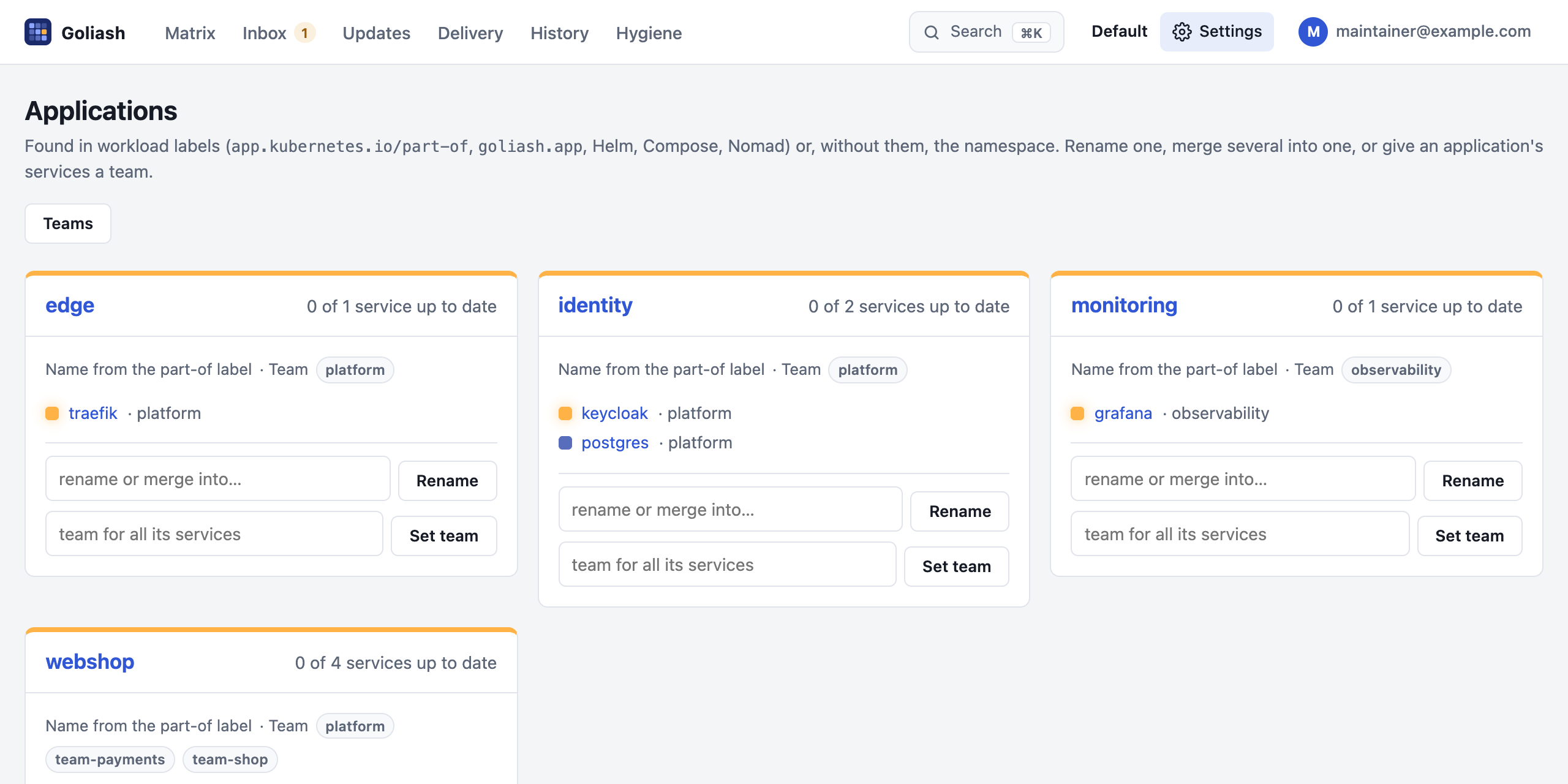
Section titled “Managing applications”Settings → Applications lists every application with where its name comes from, its team and its services. Members and up can:
- Rename an application: type a new name. Every workload with the old name is shown under the new one: the matrix, tiles, updates, delivery and drift.
- Merge applications: rename one to the name of another. The card then says From with the names it was made of.
- Split out a name again: split out next to it on the card.
- Set team: give every service of the application one team. The application keeps it as its team: services that appear in it later, without an owner, get it too (within a minute). forget next to Team for new services stops that; services keep the team they have. A service in several applications with different teams gets none, and an owner set by hand is never replaced.
To put a single service in an application whatever its labels say, set Application on the service’s page (or
goliash service set -name postgres -app identity). Empty goes back to the labels.
Open drift follows these changes: it moves to the new name and keeps when it opened and whether it was announced, so nothing is announced again.
goliash app rename -from shop-frontend -to webshop # rename; an existing name mergesgoliash app rename -from shop-frontend # its own name againA service’s team is its owner. Goliash takes it from, in this order:
- set by people: on the service page,
goliash service set -owner, or Settings → Teams (assign or rename). It is never overridden; - the workloads’ labels:
goliash.team,team,ownerorapp.kubernetes.io/team(first found). It follows label changes within a minute; - the application’s team (Set team on the Applications page), for services in it without either.
A service whose workloads name different teams, or whose applications have different teams, is left for people. The service page says where its owner came from; changing it there takes over from labels for good.
Settings → Teams lists every team with its applications and services, renames a team on all its services, and lists services without a team to give them one in a few clicks.
goliash team rename -from team-shop -to commerceRenaming a team does not change notification rules that filter by the old name: update their Owners filter too.
Label conventions
Section titled “Label conventions”Put the application and the team on the workloads where they are deployed; Goliash then needs no setup per service, and new services arrive with both.
| What | Label | Example |
|---|---|---|
| Application | app.kubernetes.io/part-of (Kubernetes standard) or goliash.app |
webshop |
| Team | goliash.team (or team, owner, app.kubernetes.io/team) |
team-shop |
| Service | app.kubernetes.io/name, else the workload name |
checkout |
Kubernetes (Deployment, StatefulSet, … labels):
metadata: labels: app.kubernetes.io/name: checkout app.kubernetes.io/part-of: webshop goliash.team: team-shopDocker Compose and Swarm (service labels; Compose names the application after the project by itself):
services: checkout: image: ghcr.io/acme/checkout:2.4.0 labels: goliash.app: webshop goliash.team: team-shopNomad (job meta):
job "checkout" { meta { "goliash.app" = "webshop" "goliash.team" = "team-shop" }}ECS: the same keys as tags on the ECS service (goliash.app, goliash.team). A different label key for
applications (say example.com/product) can be set per workspace on the Users page.
Recommended setup
Section titled “Recommended setup”- Label at the source. Add
app.kubernetes.io/part-of(orgoliash.app) andgoliash.teamto your Helm charts, manifests, Compose files or Nomad jobs. One line per workload, right everywhere and for new services. - Tidy the applications. On Settings → Applications, rename generated names (namespaces, Dokploy projects) and merge duplicates; place odd services by hand on their page.
- Give every application a team. Set team on each card covers what has no label yet, now and later.
Shared infrastructure (databases, ingress, monitoring) usually belongs to
platform. - Empty “Without a team”. Check Settings → Teams until no service is left without one.
- One name per team. Lowercase, the same as in Slack or GitHub (
team-shop, not alsoShop). Renaming later works, but rules filtering by the old name need updating. - Route notifications per team. A channel per team and rules filtered by Owners: releases and drift right away (with quiet hours), the upgrade plan weekly on Monday at 09:00 in the team’s time zone; end of life and stale agents to platform or on-call.
- One workspace for one company. Teams share it and filter their view. Use separate workspaces only for tenants that must not see each other (clients, separate organizations).
- Use it as the backlog. Each team works from Updates filtered by its team (copied as a checklist into
tickets) and the tiles grouped by team; a TV on the wall can cycle them (
/tiles?group=team&tv=1&cycle=60).
Notifications per application or team
Section titled “Notifications per application or team”A notification rule can be limited to applications (Applications in the rule form, -apps with
goliash notify create) or teams (Owners, -owners): one channel per team or product, each getting only its own
releases, drift and upgrade plan.