
Versions and drift
Where upstream versions come from
Section titled “Where upstream versions come from”For each service, Goliash picks an upstream repository: the one set on the service, else the image its main containers run. It lists that repository’s tags and keeps the newest versions the policy accepts as releases.
- Public registries are checked by the server: Docker Hub, GHCR, Quay, registry.k8s.io, gcr.io, public.ecr.aws, mcr.microsoft.com, registry.gitlab.com and docker.elastic.co.
- Every other registry, and private repositories on the public ones, are checked by the agents, with
credentials from their own environment: a configured credential,
docker login, or Kubernetes pull secrets. See Collectors.
New services are checked within a minute, then every hour. Check upstream now on a service page, or
goliash check, checks at once.
Moving tags
Section titled “Moving tags”Tags such as 1, 18-alpine or latest move: they point at whatever release was pushed last. The image that runs
has a digest, though, and the server compares it with the digests of the tags it could be (1.27.3, 1.27.2, …,
newest first). The match shows next to the tag, as 1 = 1.27.3, and from then on drift and upstream releases
are compared with that exact version: 1 = 1.27.3 is behind 28.0.0, not “1 behind 28”.
Each digest is looked up once (a digest never changes); a digest no tag matches is tried again a day later. The
lookups use HEAD requests, which Docker Hub does not count against its pull limit, and read full manifests only
for the two newest candidates when the runtime recorded a platform’s digest instead of the index’s. This needs the
digest the image runs with: Kubernetes, Docker, Swarm and Nomad report it; Compose files from Git do not. For
images on private registries the agents do the lookup with their credentials, after their next registry check.
Badges
Section titled “Badges”A service’s page offers badges for a README, a wiki or a status page: the running version and its state, in the state’s colour, for one environment or for all of them.
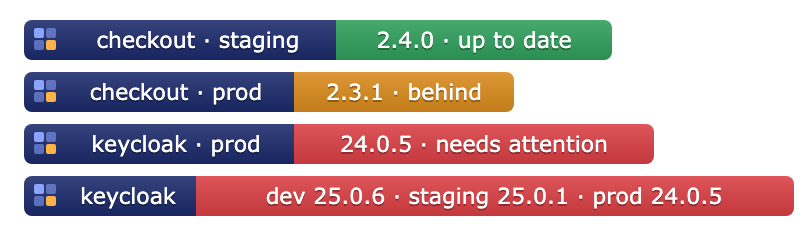
Copy markdown next to a badge gives a link that opens the service in Goliash:
[](https://goliash.example.com/services/checkout)Badges load without signing in, so GitHub and wikis can show them; they refresh within five minutes. Each address is
signed for its service and environment, so nobody can make one up for another service. Members and up see the badge
addresses. goliash badges reset makes a new signing key: every badge handed out stops loading, and the service pages
offer new ones.
Version policy
Section titled “Version policy”A policy decides which tags count as versions and which differences are worth an alert. Set it on the service
page, with goliash service set, or through the catalog.
| Field | Meaning | Default |
|---|---|---|
track |
The smallest jump worth an alert: patch, minor or major. |
patch |
pin_major |
Stay on this major: newer majors are shown, not alerted. | none |
tag_filter |
A regular expression tags must match. | tags shaped like the running one |
prerelease |
Consider alpha, beta and rc versions. | false |
drift_alert_after |
How long drift lasts before it is announced, per kind, e.g. {"env": "72h"}. |
see below |
github, github_tag_prefix |
GitHub repository (owner/repo) whose releases give dates and release notes. |
from catalog or image label |
gitlab |
GitLab project (gitlab.com/group/project) whose releases give dates and release notes; github_tag_prefix applies too. |
from catalog or image label |
changelog |
A release notes URL template with {version}. |
none |
Without a tag_filter, tags are compared like with like: a service running 1.27.2-alpine is compared with
other -alpine tags with three version parts, so latest, mainline or 1.27-bookworm do not count. A tag that is no
version names a flavour: alpine is compared with the newest 8.2.1-alpine, pg18 with 0.8.1-pg18, while
latest or stable are compared with plain releases. Tags such as -testing, -unstable or -insiders count as
prereleases.
goliash service set -name postgres -track minor -pin-major 15goliash service set -name app -tag-filter '^v\d+\.\d+\.\d+$'The catalog
Section titled “The catalog”The built-in catalog has default policies for popular public images (postgres, redis, nginx, keycloak, traefik, grafana, prometheus and more) and where their release notes live. A service without its own policy uses the catalog’s; the service page then says “from catalog”. Additions are welcome as pull requests.
Release notes
Section titled “Release notes”Releases get a publication date and a release notes link from GitHub or GitLab releases. The repository comes from, in order:
githuborgitlabin the service’s own policy,- the catalog,
- the image’s own
org.opencontainers.image.sourcelabel, read from the registry once a week. Most images built with GitHub Actions set it, so they get release notes without any setup. Docker Official Images are skipped, because their label points at the repository that packages them, not the project.
The service page says which one is used. Set GOLIASH_GITHUB_TOKEN to raise GitHub’s rate limit when you track
many services.
GitLab releases are read from gitlab.com and from one self-hosted instance set in GOLIASH_GITLAB_URL, with an
optional GOLIASH_GITLAB_TOKEN for private projects. Other hosts are never called, because a policy or an image
label must not make the server reach arbitrary addresses.
| Kind | Meaning | Announced after |
|---|---|---|
env |
An environment runs an older version than the environment before it. | 7 days |
upstream |
The version is behind the newest release by at least the tracked jump. | immediately |
inconsistent |
Targets of one environment run different versions. | 15 minutes |
declared |
What runs differs from what the Compose files in Git declare. | 30 minutes |
eol |
The running release cycle reaches its end of life within 60 days, or already has. | immediately |
Drift shows in the UI as soon as it exists. It is announced as a drift_detected event, which is what
notification rules react to, only once it has lasted the time above. That way a normal promotion from staging to
prod over a few days, or a rollout in progress, does not page anyone. Override per service:
{"drift_alert_after": {"env": "72h", "inconsistent": "1h"}}End of life
Section titled “End of life”Goliash reads support dates from endoflife.date: it knows which product an image is
(postgres → PostgreSQL, through the site’s package URLs, or the catalog’s eol field), picks the release cycle of
the running version (15.6 → 15, 7.2.4 → 7.2) and opens eol drift 60 days before that cycle stops being supported,
or at once when it already has. Set "eol": "postgresql" in a service’s policy to name the product yourself, or
"eol": "none" to turn it off. Without internet access, start the server with -eol=false.
Declared versus running
Section titled “Declared versus running”A compose target describes what should run; docker, kubernetes and the other targets report what does
run. When an environment has both, the matrix shows what runs, and declared drift appears when it differs from
the files: “Git says 1.5.0” while prod still runs 1.4.2 because a deploy failed or never happened, or someone
changed a container by hand. When an environment only has Compose files, the matrix shows the declared versions,
marked declared.
When the drift ends, a drift_resolved event follows.
Updates
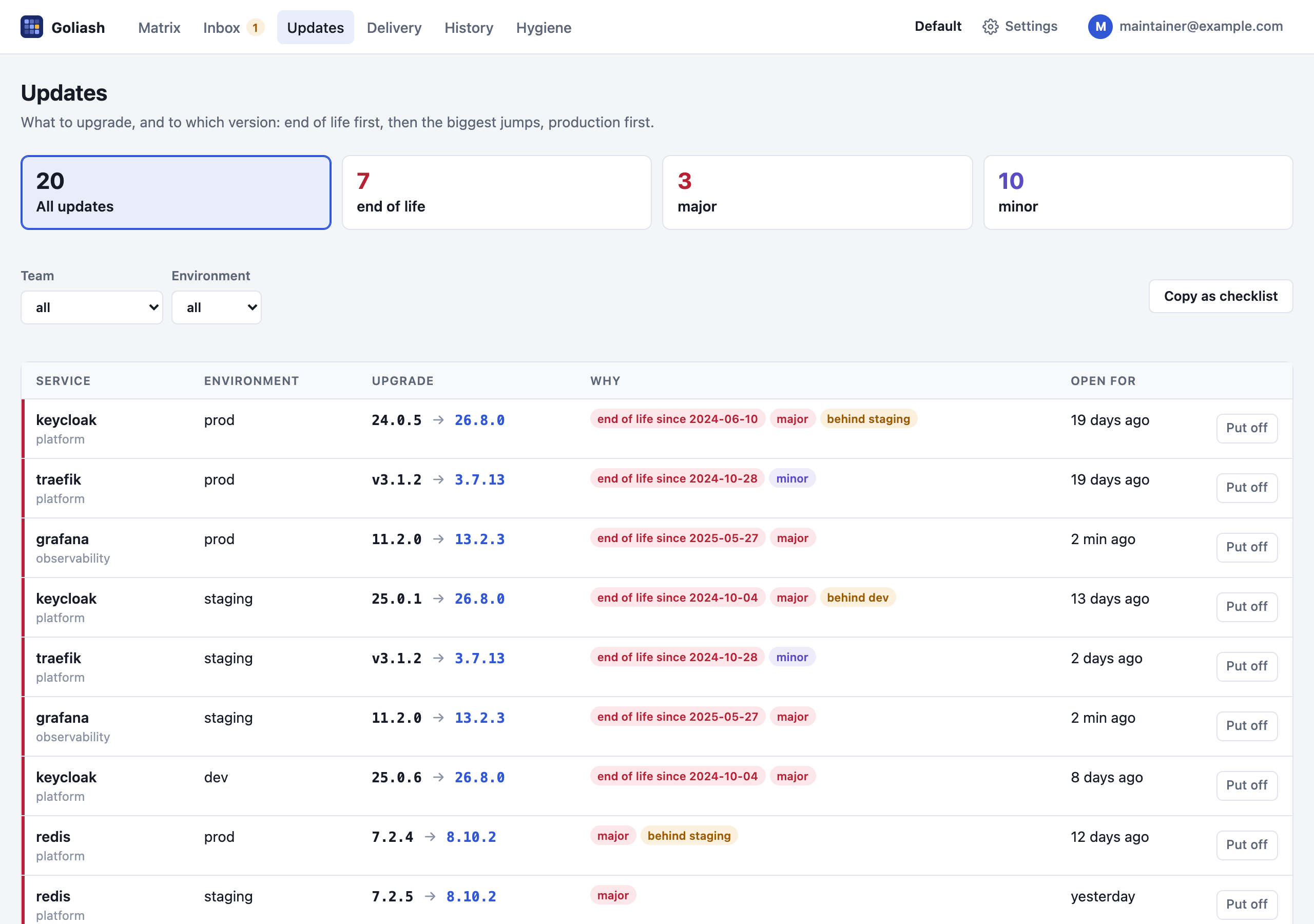
Section titled “Updates”Updates is a to-do list of upgrades: one line per service (and application) and environment with open end of life, upstream or environment drift. Each line shows what runs, the version to move to, with its release notes, and why. They are ordered by urgency (end of life passed, end of life soon, major, minor, behind the previous environment, patch), production first, then by how long they have been open. The tiles filter by urgency, and the selects by team and environment. Copy as checklist copies the list as markdown checkboxes for a ticket or a planning board. Put off on a line skips that version (until a newer release is out) or puts it off for a week or 30 days; it is an acknowledgement for that service and environment, so its notifications go quiet too. Updates put off are kept apart under Acknowledged.
The same list is GET /api/v1/updates and the MCP tool updates, for an assistant to plan with. A notification rule
with the upgrade plan sends it every week; see Upgrade plan.
Promotions and delivery
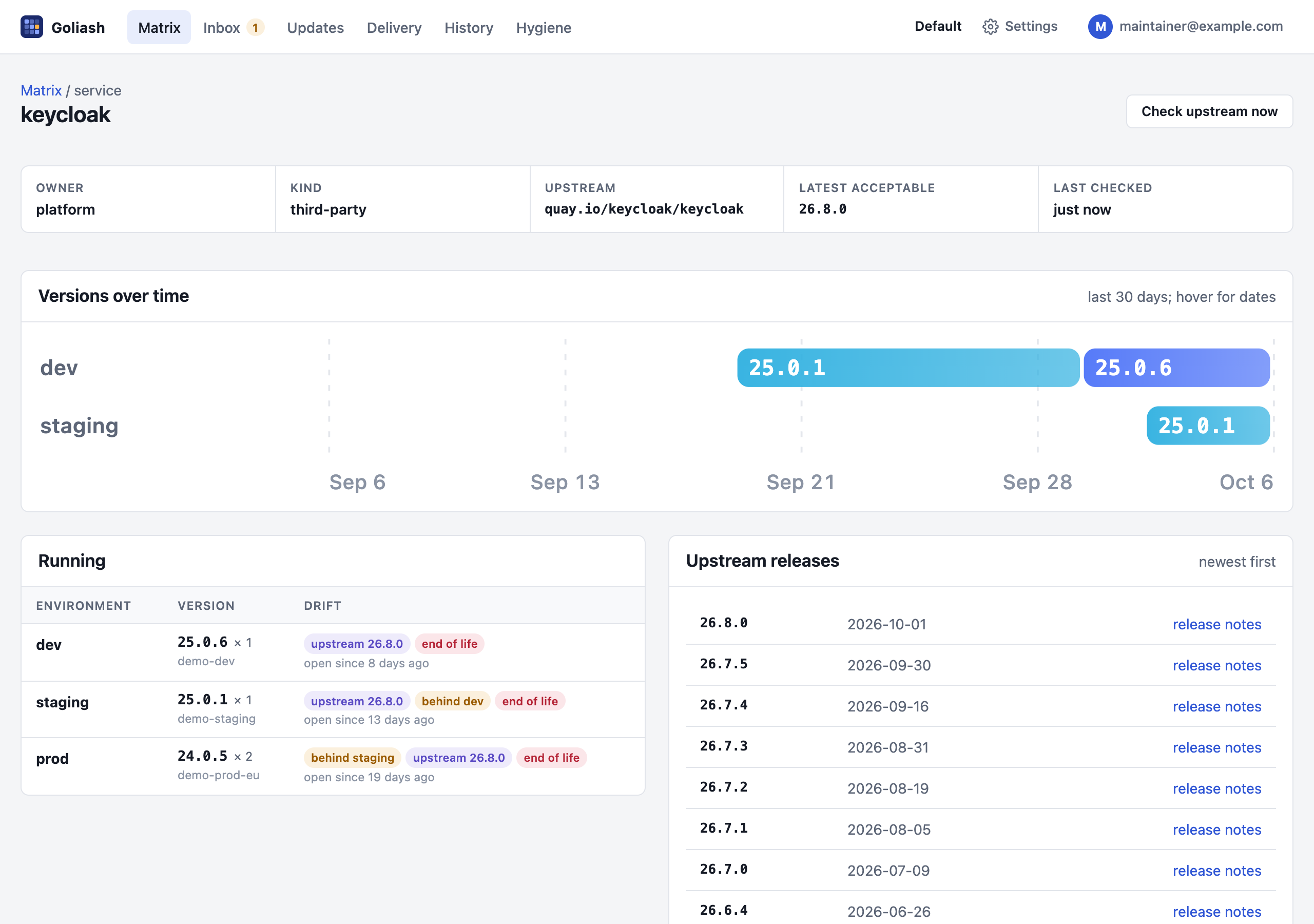
Section titled “Promotions and delivery”The Delivery page opens with two charts: versions that arrived per week and environment over the last twelve weeks, and how much drift was open each day of the last thirty, by kind. Every service page shows Versions over time: which version ran in each environment (one lane per target where an environment has several) over the last thirty days; hover a bar for its dates. The charts are drawn on the server, follow the light or dark theme and need no script.
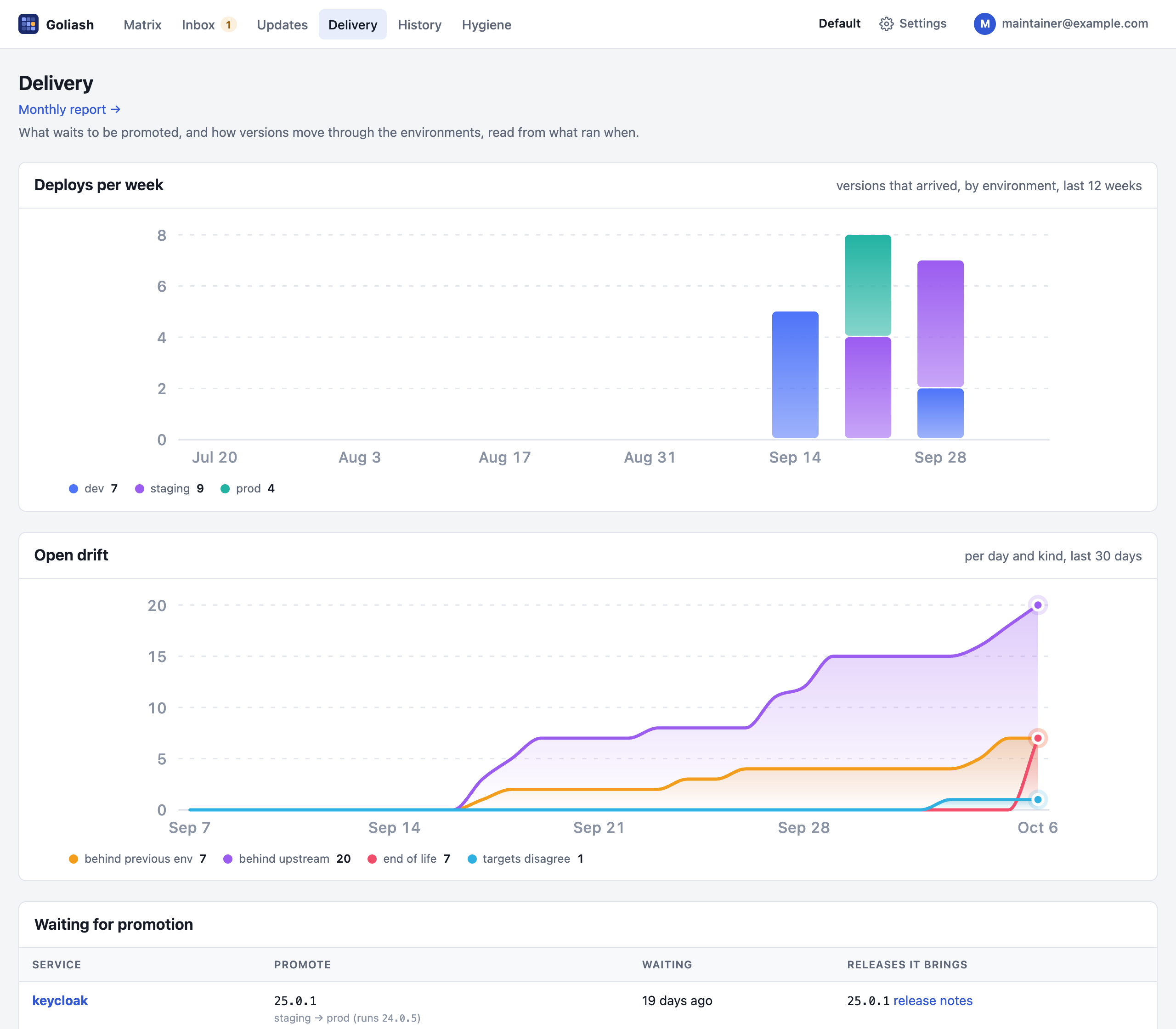
The Delivery page lists every version that runs in one environment and waits for the next, longest waiting
first, with the releases a promotion would bring and their release notes. It is the list to go through before a
release to production; goliash promotions and GET /api/v1/promotions show the same.
goliash promotionsSERVICE PROMOTE FROM → TO WAITING RELEASESpayments-api 1.5.0 → 1.6.0 staging → prod 3d 1.6.0, 1.5.1postgres 15.6 → 15.7 staging → prod 26h 15.7Below it, the page shows how versions moved over the last 30 days, read from what ran when rather than from CI: how many versions arrived in each environment, and the median time a version took from one environment to the next (its lead time, e.g. staging → prod).
goliash delivery -window 720hThe same numbers are in GET /api/v1/delivery?window=30d and in /metrics as goliash_deploys and
goliash_lead_time_seconds, for dashboards and alerts such as “nothing reached prod for two weeks”.
Monthly report
Section titled “Monthly report”Delivery → Monthly report shows one month of a workspace on one page: services and targets, versions deployed
per environment with lead times, new upstream releases, and everything that needs attention now (end of life,
differences from Git, lagging versions), most important first. Print or save as PDF gives a clean document,
for a monthly review or, with a workspace per client, an MSP’s report to each client. Pick the month with
/report?month=2026-09.
Acknowledging
Section titled “Acknowledging”An acknowledgement silences notifications for a service, optionally in one environment, until a version ships or a time passes:
goliash ack -service postgres -kind release -until-version 17.0 # "we know about 16, quiet until 17"goliash ack -service web -kind drift -env prod -for 336h # quiet for 14 daysThe same works on the service page and through POST /api/v1/acks.