
Argo CD and Flux
With Argo CD, Git says what should run and Argo CD makes it so. Goliash shows both sides on one page: what Git declares for a service, which commit was last synced, whether Argo CD is in sync and healthy, and what actually runs, on which version, against the newest release upstream.
What you see
Section titled “What you see”- The service page has an Argo CD panel: per environment and cluster, the application that deploys the service, its repository and path (or Helm chart) with the branch or tag it follows, the commit last synced (a link to the commit on GitHub, GitLab, Bitbucket or Gitea), and its sync and health status, with how long it has been so. Once the application syncs a new commit, changes links what changed in Git since the one before (a compare view on GitHub, GitLab or Gitea), and the alert for an application degraded or out of sync right after links the same, as Git changes. With a token for the repository (see Set up), an application out of sync also says which version Git pins and which runs: Git pins 1.7.0, runs 1.6.0, the answer to “why did my change not go out?”. It is read from the files under the application’s path, at most every 10 minutes, never while you wait. The matrix cell’s tooltip and the out-of-sync alert say the same.
- The matrix and the tiles mark a cell Argo: out of sync, Argo: degraded or Argo: missing when the application has been so for more than 10 minutes: Argo CD is out of sync for a moment on every change, and progressing while it rolls out, which is not news. On the tiles such a cell needs attention.
A notification rule with the gitops event (Argo CD out of sync or degraded) says so in Slack, Teams, e-mail or a
push, once per episode, with the commit last synced; Goli and AI assistants read the same through the gitops tool
and GET /api/v1/gitops, which for a degraded application also gives the version change in the day before it
(after_change). GET /api/v1/pull-requests and the pull_requests tool list the pull requests Goliash opened.
GitOps applications (/gitops, linked from the Delivery page and every GitOps panel) lists them all, on every
cluster, those degraded, missing or out of sync first, with what Git pins, the pull requests and the rollbacks on
offer; Needs attention leaves the rest out.
Upgrade with a pull request
Section titled “Upgrade with a pull request”With GOLIASH_GITOPS_TOKEN set on the server, the panel offers Open PR → 1.7.0 next to an application that runs
an older version than the newest release the service’s version policy accepts.
Goliash then, in the repository the application deploys from (GitHub, GitHub Enterprise or GitLab):
- finds the YAML files under the application’s path that pin the image at the running version: an image reference
(
image: ghcr.io/acme/checkout:1.4.2), Kustomize’simages(namewithnewTag) or Helm values (repositorywithtag); other images, and the same tag of other images, stay as they are; - changes the tag on a new branch
goliash/<service>-<version>-<environment>, from the branch the application follows; - opens a pull request (a merge request on GitLab, in one commit) saying what, where and why, with the release notes when known.
The matrix offers it too, in the cell (PR → 1.7.0, a link to the pull request once opened), to members. The Updates page offers Open PR on the same lines, next to Put off, with a tick to open several at once (Open the ticked pull requests, up to 20, each as its own pull request, or with one per repository as one pull request per repository, branch and environment, a line per service), and the Security page next to each service that runs behind a newer release, so the person who finds the exposure can propose the fix. The Delivery page does the same for promotions: next to a version that runs in staging and waits for prod, Open PR → prod pins that version in the repository of prod’s application (one button per cluster when several run it), saying since when it has run in staging. When several services of one application wait together, Promote webshop-prod → prod opens one pull request that changes all their tags, in the files that pin them, with a line per service: the whole application moves at once, as you would review it.
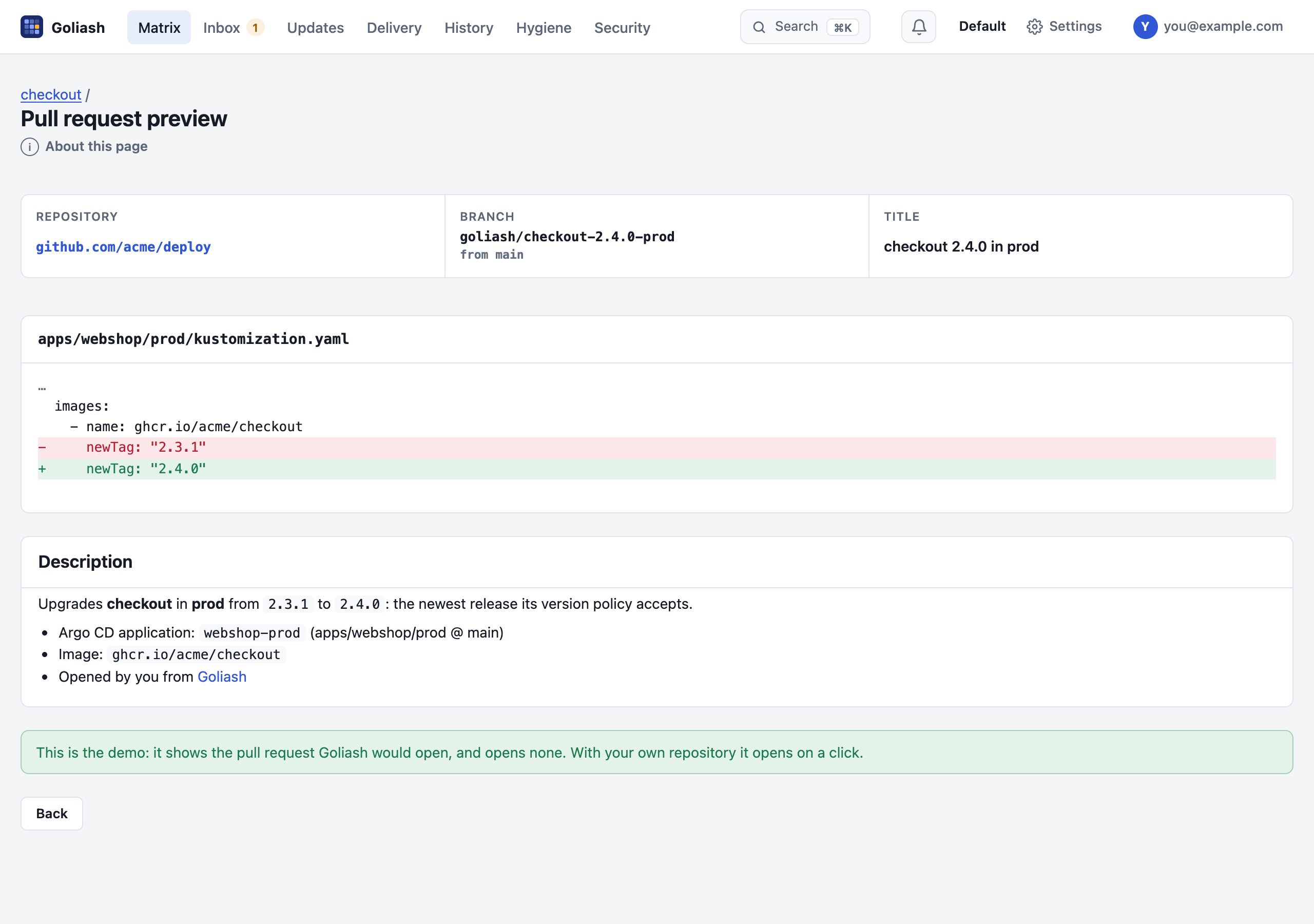
Open PR first shows a preview: the files that pin the image with the lines that change, the branch, the title and the description, read from the repository and changing nothing; Open the pull request sends it. The public demo shows the preview with made-up repositories and opens nothing.
With Goli on, the description also says what changes: Goli reads the release notes between the two versions and lists, in a few lines, what breaks or needs a migration first, then the notable fixes, security first. It is marked as Goli’s, and asked once a day per upgrade.
Each pull request lists the known vulnerabilities the upgrade fixes (exploited in the wild first) and those it brings, from the SBOMs of both images. It also says which packages the upgrade brings, or relicenses, under terms that need a look before merging: network copyleft (AGPL, SSPL), source-available (BUSL, Elastic) or strong copyleft (GPL), with the license they had before (operating system packages and permissive licenses left out; not legal advice). A version is proposed once: after that the page links the pull request, marked merged once it is. Renovate, Dependabot or a person may have proposed it first: when an open pull request in the repository names the image and the version in its title (Update ghcr.io/acme/api Docker tag to v1.5.0, Bump api from 1.4.2 to 1.5.0), the pages link that one instead (hover: Opened outside Goliash), and neither a click nor a version policy opens a second. The Delivery page lists the pull requests of the last 30 days, open, merged or closed, who opened them, and running once the version runs, with how long after opening it began to (3h after opening, 20m after merging) and the medians over them all at the top: your time from proposal to production, and from merge to production (what sync windows, manual syncs and slow pipelines cost; the merge time is the forge’s). Goliash asks the forge every 30 minutes, also what the checks (CI) say: checks pass, checks running or checks fail next to the link, and once an alert (Pull request failing) when they fail; one closed without merging is offered again on the page (the version policy does not open it again: closing it was a no).
A merged pull request whose version does not run yet is marked not deployed, with when it was merged and why it waits when Goliash can tell: a sync window holds it, Flux has it suspended, Argo CD syncs it by hand, or the tool has not synced the commit yet. An hour after the merge it is announced once (Merged, not deployed): a merge is not a deploy.
Roll back
Section titled “Roll back”When an application turns Degraded or Missing (for more than ten minutes) within a day of a service’s version replacing another on that cluster, the panel offers that service Rollback PR → 1.6.2: a pull request that pins the version before again. Hover it to see why. The pull request says it rolls back, what went wrong and since when, and which known vulnerabilities the older version brings back. As with every pull request, you review and merge it, and GitOps deploys it.
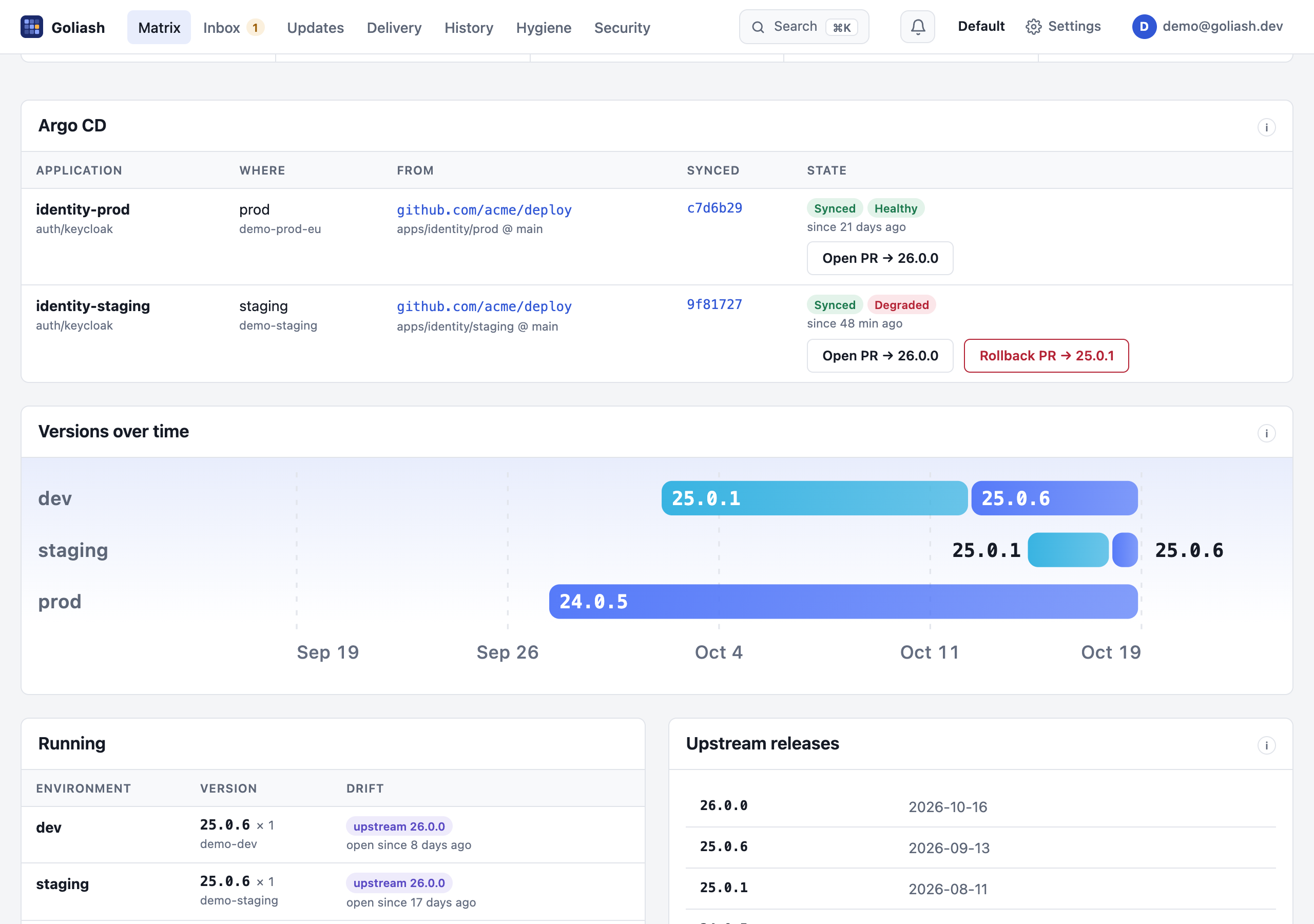
The alert for a degraded or missing application says the same: degraded on k8s-prod, an hour after 1.7.0 replaced 1.6.2, the likeliest cause first. Its Rollback PR → 1.6.2 button (Slack, Teams, Discord, chat, e-mail) opens that pull request’s preview in Goliash: from the alert to the fix in one click.
Change freezes
Section titled “Change freezes”During a change freeze automatic pull requests wait, those opened by hand say they were opened during one and their preview warns first; rollbacks are not held back.
Sync windows
Section titled “Sync windows”Argo CD’s sync windows are read from each
application’s AppProject: while an open deny window matches an application, or it has allow windows none
of which is open, Argo CD will not sync it, and Goliash says so:
- the application gets a sync window badge, its title saying which window and until when (Monday 06:00 for a weekend freeze, or when the next allow window opens);
- automatic pull requests for it wait until the window allows a sync again: merged now, the change would sit in Git;
- a pull request opened by hand says it deploys when the window allows it, and its preview warns first.
Windows match an application by name, destination namespace or destination cluster (globs, andOperator honoured),
in their timeZone; schedules are standard five-field cron (names, ranges, steps and @daily-style descriptors).
The API’s GET /api/v1/gitops returns sync_blocked and sync_blocked_until.
Manual sync
Section titled “Manual sync”An application without an automated sync policy (spec.syncPolicy.automated, or with it enabled: false) deploys
only when someone syncs it. Goliash badges it manual sync; its pull requests (opened by hand or by the policy)
say that merging does not deploy it and link the application in Argo CD (with GOLIASH_ARGOCD_URL), and its
out of sync alert says Argo CD waits for someone to sync it. The API returns manual_sync.
Reviewers and labels
Section titled “Reviewers and labels”A service’s version policy can name who reviews its pull requests and how they are labelled: Pull request
reviewers alice, @acme/payments (people, and teams as @org/team) and Pull request labels
dependencies, goliash (pr_reviewers and pr_labels in the policy’s JSON). GitHub and Gitea/Forgejo get both;
GitLab gets the labels and the people as reviewers. A name the forge does not know is skipped: the pull request
opens either way. A pull request for several services (a grouped upgrade, an application’s promotion) asks
every service’s reviewers and carries every service’s labels.
Automatic pull requests
Section titled “Automatic pull requests”A service’s version policy can ask for them per environment: Automatic pull requests dev=minor, staging=patch
on its page ("auto_pr": {"dev": "minor", "staging": "patch"} in the policy) has Goliash open, every 30 minutes,
the pull request for dev when the newest acceptable release is at most a minor jump away, and for staging when it is
a patch. Production stays a decision, a click away. They are signed auto-pr in the pull request and the audit log;
one that cannot be opened (no file pins the tag) is tried again the next day.
Review and merge it as any change; Argo CD deploys it. Goliash never merges, never pushes to the branch an application follows, and offers only the release the policy accepts. An image pinned by digest is left for you (the new digest has to come with it).
The token is a fine-grained GitHub token limited to the deploy
repositories, with Contents and Pull requests read and write. For GitHub Enterprise set GOLIASH_GITOPS_GITHUB_API
to its API address (https://github.example.com/api/v3). For GitLab set GOLIASH_GITOPS_GITLAB_TOKEN: a project or
group access token with the api scope and the Developer role, on gitlab.com or the instance in GOLIASH_GITLAB_URL.
For Gitea or Forgejo (Codeberg too) set GOLIASH_GITEA_URL to the instance (https://git.example.com) and
GOLIASH_GITOPS_GITEA_TOKEN to an access token with write:repository; it needs Gitea 1.20 or Forgejo 1.20 or
newer. Several can be set at once: each repository goes to the forge of its host. Only members and admins see the button; each pull request is
in the audit log.
Set up
Section titled “Set up”Nothing to configure in Argo CD. The agent (or the server collecting its own cluster) reads Argo CD’s
Application objects, read-only, and finds each workload among the resources an application lists, and the
AppProject objects for their sync windows. The Helm charts grant get and list on both; with
your own RBAC add:
- apiGroups: ["argoproj.io"] resources: ["applications", "appprojects"] verbs: ["get", "list"]Without appprojects everything works but sync windows.
Applications in any namespace are found (Argo CD’s apps in any namespace included), and multi-source applications show the source with a path or chart. Without Argo CD in the cluster, or without the permission, nothing changes.
To link application names to the Argo CD UI, set its address on the server:
GOLIASH_ARGOCD_URL=https://argocd.example.comWith Flux the same panel, badges (Flux: out of sync, Flux: degraded), alerts and pull requests work from Flux’s
own objects; nothing to configure in Flux either. Flux labels everything it applies with its Kustomization or
HelmRelease (kustomize.toolkit.fluxcd.io/name, helm.toolkit.fluxcd.io/name), and Goliash reads those with their
sources:
- a Kustomization: its GitRepository’s URL and branch (or tag, semver), its path, and the commit last applied
(
main@sha1:…); out of sync when the GitRepository has a newer commit than the one applied, degraded when itsReadycondition fails (reconciliation, health checks), suspended when suspended; - a HelmRelease: its chart, the version it follows and the one applied, and its HelmRepository; a HelmRelease wins over the Kustomization that applied it.
A suspended Kustomization or HelmRelease (spec.suspend: true) is treated like an Argo CD
sync window: automatic pull requests wait until it is resumed, and one opened by hand says it deploys
once it is.
ssh://git@github.com/acme/deploy and git@… addresses link to the repository’s web page, and pull requests work
for them as for Argo CD. The Helm charts grant get and list on Flux’s kustomizations, helmreleases,
gitrepositories and helmrepositories.
Without Argo CD or Flux
Section titled “Without Argo CD or Flux”Nomad jobs, Compose files and ECS task definitions live in Git too. Name the place in the workload’s labels and the same pull requests work, without a GitOps tool:
| Label | |
|---|---|
goliash.git.repo |
The repository: https://github.com/acme/infra (GitHub, GitLab, Gitea or Forgejo, with the token above) |
goliash.git.path |
The file, or a directory of files, that pins the image: nomad/vault.nomad.hcl |
goliash.git.branch |
The branch, when not the repository’s default |
On Nomad they go in the job’s meta (job, group or task); on Docker, Compose and Swarm in labels; on ECS as tags.
job "vault" { meta { "goliash.git.repo" = "https://github.com/acme/infra" "goliash.git.path" = "nomad/vault.nomad.hcl" } # …}The service page then shows a Git panel with Open PR, and the Updates, Security and Delivery pages, the
auto_pr version policy, the preview and the reminders work as for Argo CD. Goliash changes the tag where the file
pins it, in HCL (image = "hashicorp/vault:1.17.2"), YAML, JSON task definitions or Terraform. A service without
the labels shows its members the lines to add, for the platforms it runs on. With no sync state to read, there is no out of
sync, Git pins or rollback offer: those need Argo CD or Flux.
Why it helps
Section titled “Why it helps”- Drift with a cause. A service behind upstream or behind the previous environment, and the commit and path that pin it: one click to the line to change.
- Out of sync for an hour is a deploy that did not happen: a sync window, a failing hook, auto-sync off. Goliash shows it next to the version that still runs.
- Hand changes stand out: OutOfSync while the running version differs from what Git declares.