
SigNoz dashboard
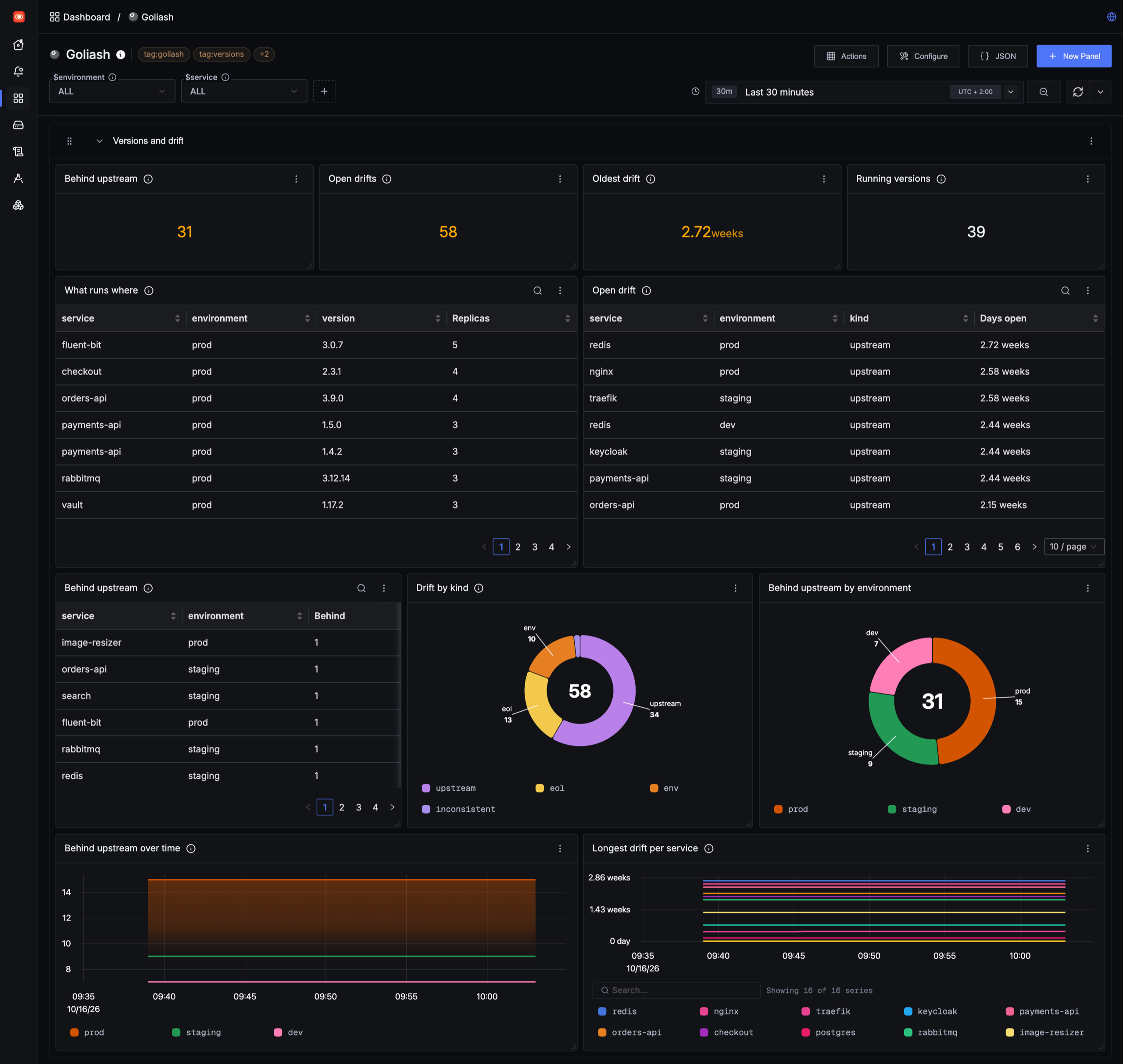
Goliash serves what runs where, drift, delivery speed, security posture and its own health at /metrics. The
OpenTelemetry Collector that already sends to SigNoz can scrape it, and a ready-made dashboard shows it next to your
traces, logs and service metrics.
The quickest way is Settings → Integrations in Goliash: it creates a viewer token with one click and shows the collector settings filled in for your server, next to a download link for the dashboard. The steps below do the same by hand.
1. A token for the collector
Section titled “1. A token for the collector”/metrics needs an API token with the viewer role. Create one under Users → API tokens, or:
goliash token create -name signoz -role viewerSave the glsh_api_… value in a file and mount it into the collector container, e.g. as
/etc/otelcol/goliash-token.
2. Scrape Goliash with the OpenTelemetry Collector
Section titled “2. Scrape Goliash with the OpenTelemetry Collector”Add a Prometheus receiver to the collector that sends to SigNoz, in its own pipeline:
receivers:  prometheus/goliash:    config:      scrape_configs:        - job_name: goliash          scrape_interval: 60s          scheme: https          authorization:            credentials_file: /etc/otelcol/goliash-token          static_configs:            - targets: [goliash.example.com]
service:  pipelines:    metrics/goliash:      receivers: [prometheus/goliash]      processors: [batch]      exporters: [otlp]   # the exporter your SigNoz collector already uses
Where this goes depends on how SigNoz runs:
- Docker (Foundry): the ingester’s configuration,
pours/deployment/ingester/ingester.yaml. Set it throughconfig.dataincasting.yaml, sincefoundryctl forgewritespours/again, and add the token file to the ingester’s volumes. On the older Docker Compose install it isotel-collector-config.yaml. - Kubernetes (Helm):
otelCollector.configin the Helm values, with the token from a secret mounted into the collector. - SigNoz Cloud: run a collector of your own with the ingestion key, or add the receiver to the one you already run.
The metrics keep their Prometheus names and labels, so the queries in Metrics and alerts work as they are.
3. Import the dashboard
Section titled “3. Import the dashboard”Download deploy/signoz/goliash-dashboard.json,
then in SigNoz open Dashboards → New dashboard → Import JSON and upload or paste it. The environment and
service variables at the top apply to every panel.
- Versions and drift: services behind upstream, open drifts and the oldest, what runs where, services running more than one version.
- Delivery (last 30 days): rollouts stuck or down (and a table of them), deploys, rollbacks, the median and slowest lead time from one environment to the next, deploys
per service and the lead time table. Lead time needs at least two environments; with only one, its panels stay
empty and SigNoz says it cannot find
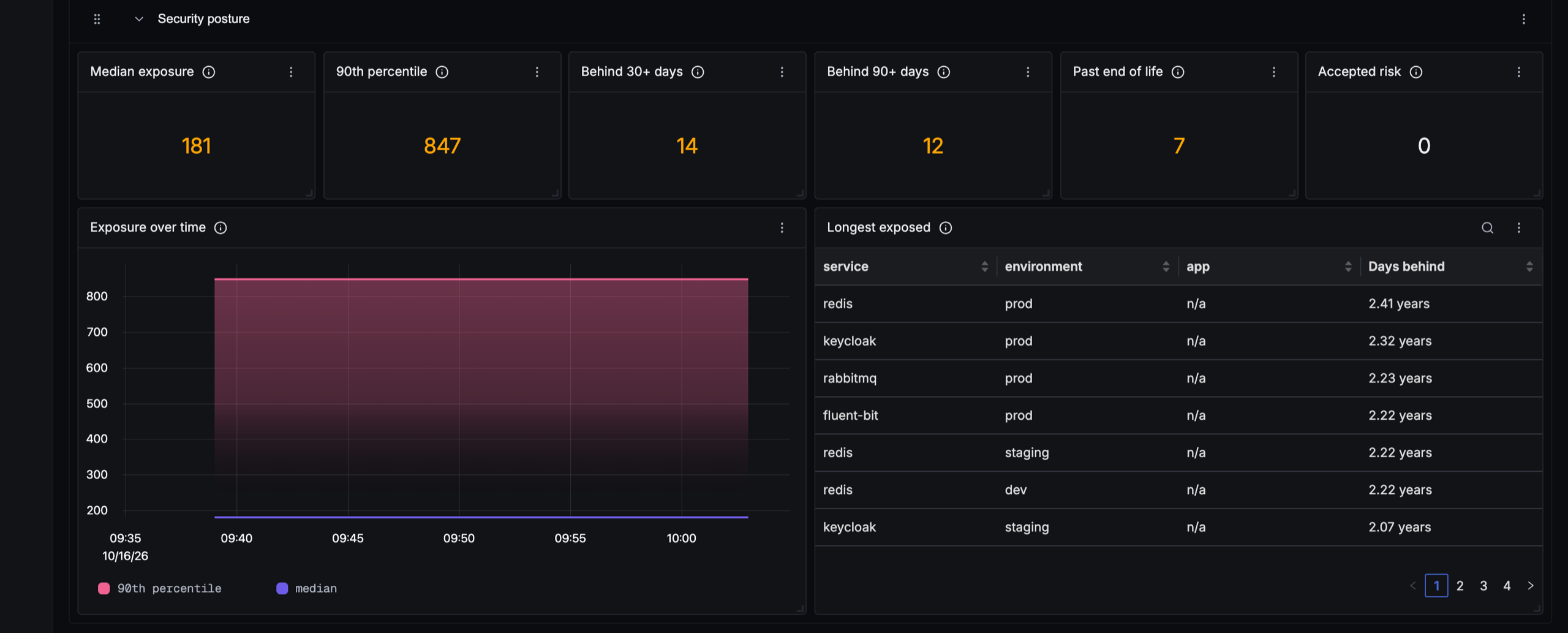
goliash_lead_time_seconds. - Security posture: how long production has run behind available releases (median and 90th percentile, and over time: is patching getting faster?), services behind for 30 and 90 days, past end of life, accepted risk, and the longest exposed services, and packages by license class (copyleft, source-available and unknown ones that need a look).
- Vulnerabilities: exploited ones (CISA KEV), those past CISA’s due date, how long the oldest exploited one has run, critical ones, and vulnerabilities by severity over time.
- Image hygiene: moving tags, tags pushed again, untrusted registries, outdated bases, sizes over budget and images without a digest.
- Images: what pulling each service’s image downloads over time and against its size budget, bases with a newer build than the image is built on, images missing a signature, SBOM or provenance, and layer counts.
- Goliash itself: agents online and stale, snapshots waiting, failing notifications, the server running the background work and the running version.
4. Deploys next to your services
Section titled “4. Deploys next to your services”SigNoz has no annotations. Put the Deploys per service panel next to your service’s latency or error panels, so a spike lines up with the deploy that may have caused it, or alert on new versions (below).
5. Alerts
Section titled “5. Alerts”The queries in Metrics and alerts work in SigNoz alerts as they are: create an alert
with a PromQL query, for example sum(goliash_outdated{environment="prod"}) > 0 for production behind upstream, or
goliash_end_of_life{state="passed"} > 0 for production past end of life.
Alerts about versions themselves (new releases, drift, removed services) are better sent by Goliash directly; see Notifications.
Using Grafana instead? See Grafana dashboard.