
Grafana dashboard
Goliash serves what runs where, drift, delivery speed, security posture and its own health at /metrics. Scrape
it with Prometheus, import the ready-made dashboard, and Grafana shows it next to the rest of your graphs, with a
marker for every deploy.
The quickest way is Settings → Integrations in Goliash: it creates a viewer token with one click and shows the scrape settings filled in for your server, next to a download link for the dashboard. The steps below do the same by hand. On Kubernetes, the Helm chart sets up all of it.
1. A token for Prometheus
Section titled “1. A token for Prometheus”/metrics needs an API token with the viewer role. Create one under Users → API tokens, or:
goliash token create -name metrics -role viewerSave the glsh_api_… value in a file Prometheus can read, e.g. /etc/prometheus/goliash-token.
2. Scrape Goliash
Section titled “2. Scrape Goliash”scrape_configs: - job_name: goliash scrape_interval: 60s scheme: https authorization: credentials_file: /etc/prometheus/goliash-token static_configs: - targets: [goliash.example.com]Grafana Alloy and Grafana Cloud take the same settings in a prometheus.scrape block; VictoriaMetrics reads the same
scrape_configs.
3. Import the dashboard
Section titled “3. Import the dashboard”Download deploy/grafana/goliash-dashboard.json,
then in Grafana open Dashboards → New → Import, upload the file and pick the Prometheus data source. The
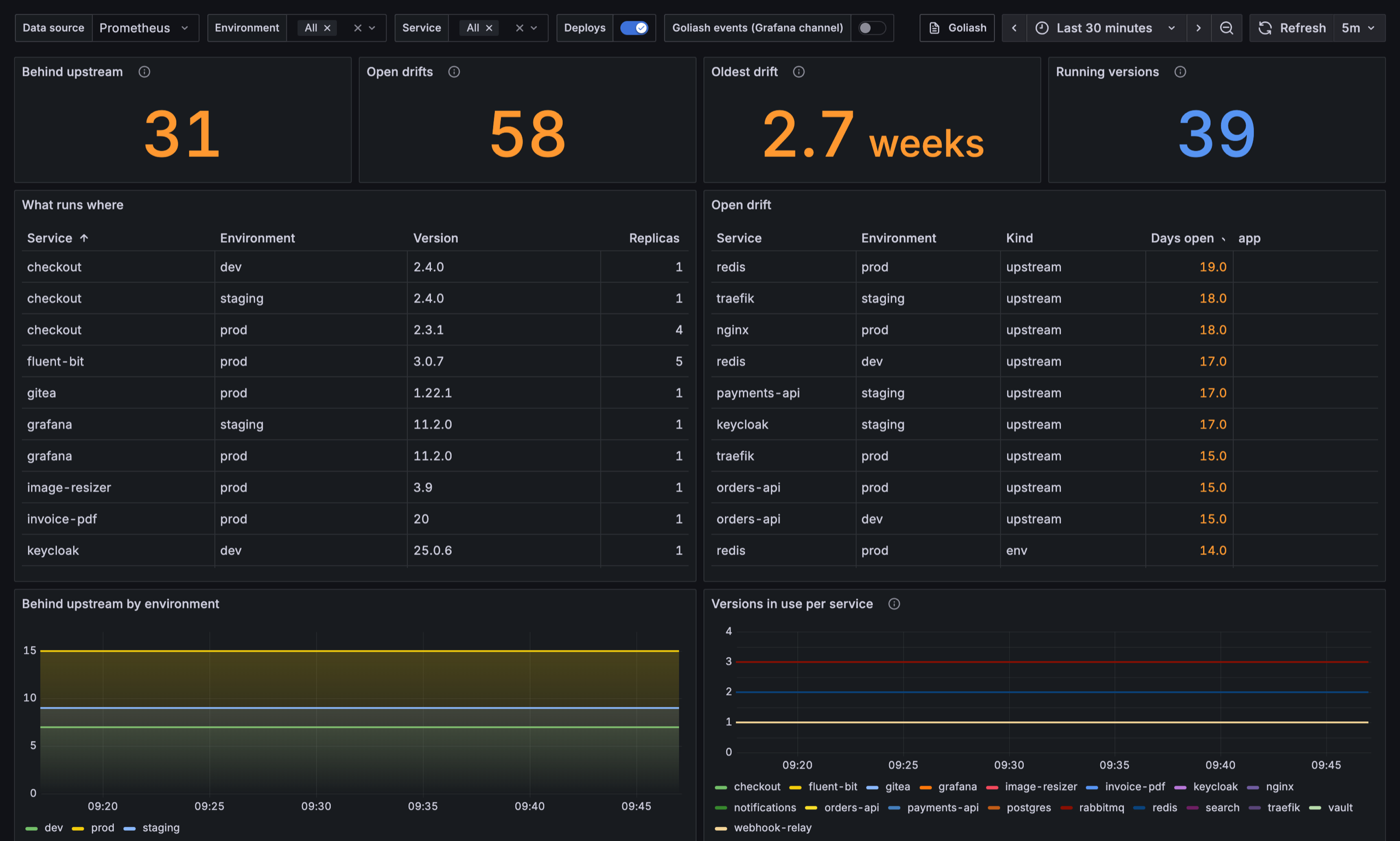
Environment and Service filters at the top apply to every panel.
- Versions and drift: services behind upstream, open drifts and the oldest, what runs where, services running more than one version.
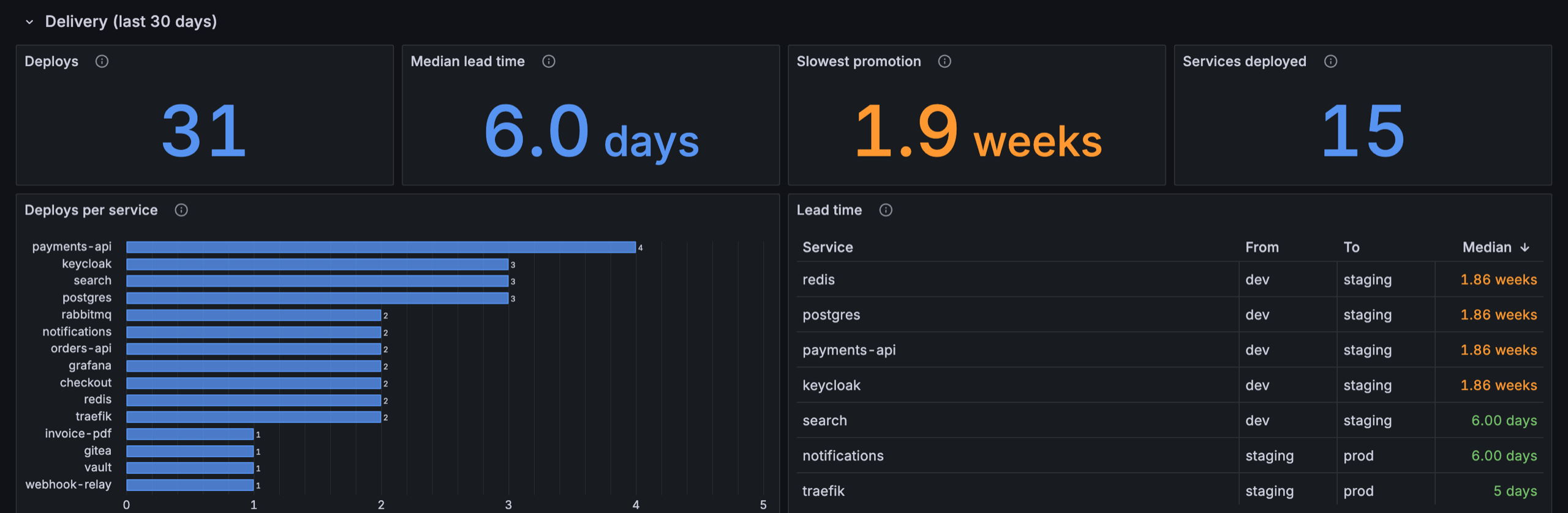
- Delivery (last 30 days): rollouts stuck or down (and a table of them), deploys, rollbacks and the change failure rate, the median and slowest lead time from one environment to the next, deploys per service and the lead time table. Lead time needs at least two environments; with only one, its panels stay empty.
- Security posture: how long production has run behind available releases (median and 90th percentile, and over time: is patching getting faster?), services behind for 30 and 90 days, past end of life, accepted risk, and the longest exposed services, and packages by license class (copyleft, source-available and unknown ones that need a look).
- Vulnerabilities: exploited ones (CISA KEV), those past CISA’s due date, how long the oldest exploited one has run, critical ones, and vulnerabilities by severity over time.
- Image hygiene: moving tags, tags pushed again, untrusted registries, outdated bases, sizes over budget and images without a digest.
- Images: what pulling each service’s image downloads over time and against its size budget, bases with a newer build than the image is built on, images missing a signature, SBOM or provenance, and layer counts.
- GitOps and pull requests: GitOps applications, those out of sync or unhealthy (and which), held by a sync window or synced by hand; pull requests by state, merged ones not deployed, and the medians from opening and from merging to running.
- Goliash itself: agents online and stale, snapshots waiting, failing notifications, the server running the background work and the running version.
4. Deploys on your graphs
Section titled “4. Deploys on your graphs”From the metrics. The Goliash dashboard has a Deploys annotation that marks every new version, read from
goliash_deployed_version_info. To get the same markers on any other dashboard, add an annotation query on the same
Prometheus data source:
count by (service, environment, version) ( goliash_deployed_version_info{environment="prod"} unless goliash_deployed_version_info offset 10m)with Title {{service}} {{version}} and Tags environment,service. A latency spike right after a marker says
which deploy to look at first.
From Goliash events. A Grafana channel writes every event as an
annotation tagged goliash, the event type, the service and the environment, at the moment Goliash saw it. The
Goliash dashboard has a Goliash events annotation for them, off by default.
5. Alerts
Section titled “5. Alerts”Ready-made Prometheus rules are in
deploy/prometheus/goliash-alerts.yaml
(also a download on the Integrations page): add the file to rule_files in prometheus.yml, or paste the queries
into Grafana alerting. The full list is in Metrics and alerts.
Kubernetes
Section titled “Kubernetes”With the Prometheus Operator (kube-prometheus-stack) and Grafana’s dashboard sidecar, the Helm chart sets up all of the above. Create the token secret first, then turn the parts on:
kubectl create secret generic goliash-metrics --from-literal=token=glsh_api_…helm upgrade --install goliash oci://ghcr.io/pipozzz/charts/goliash \ --set metrics.serviceMonitor.enabled=true \ --set metrics.serviceMonitor.labels.release=kube-prometheus-stack \ --set metrics.prometheusRule.enabled=true \ --set metrics.prometheusRule.labels.release=kube-prometheus-stack \ --set metrics.grafanaDashboard.enabled=trueThe release label must match your Prometheus’ serviceMonitorSelector and ruleSelector; the dashboard ConfigMap
carries grafana_dashboard: "1", which the sidecar of kube-prometheus-stack looks for.
Using SigNoz instead? See SigNoz dashboard.